TMS: Documents Upload

TrainingManager365 is a role-based training management platform used by aviation and safety-critical industry organizations. The platform manages training records, activity timelines, certifications, and compliance verification across multiple user roles.
As part of a broader platform evolution, the Documents feature was introduced to digitize and centralize role-based document verification — replacing fragmented, manual processes with a structured, AI-assisted workflow.
Company:
NDA

Problem
Organizations operating in regulated industries require staff to hold valid, role-specific documents — such as passports, medical certificates, and type ratings — before they can be cleared for active duty. The existing process relied on email exchanges, physical submissions, and manual review, creating significant compliance risk and administrative overhead.
01
No centralized document repository
Documents were scattered across email threads, local drives, and physical folders
02
No automated validity checking
Expiry dates and document types were verified manually, introducing human error and delays
Goals
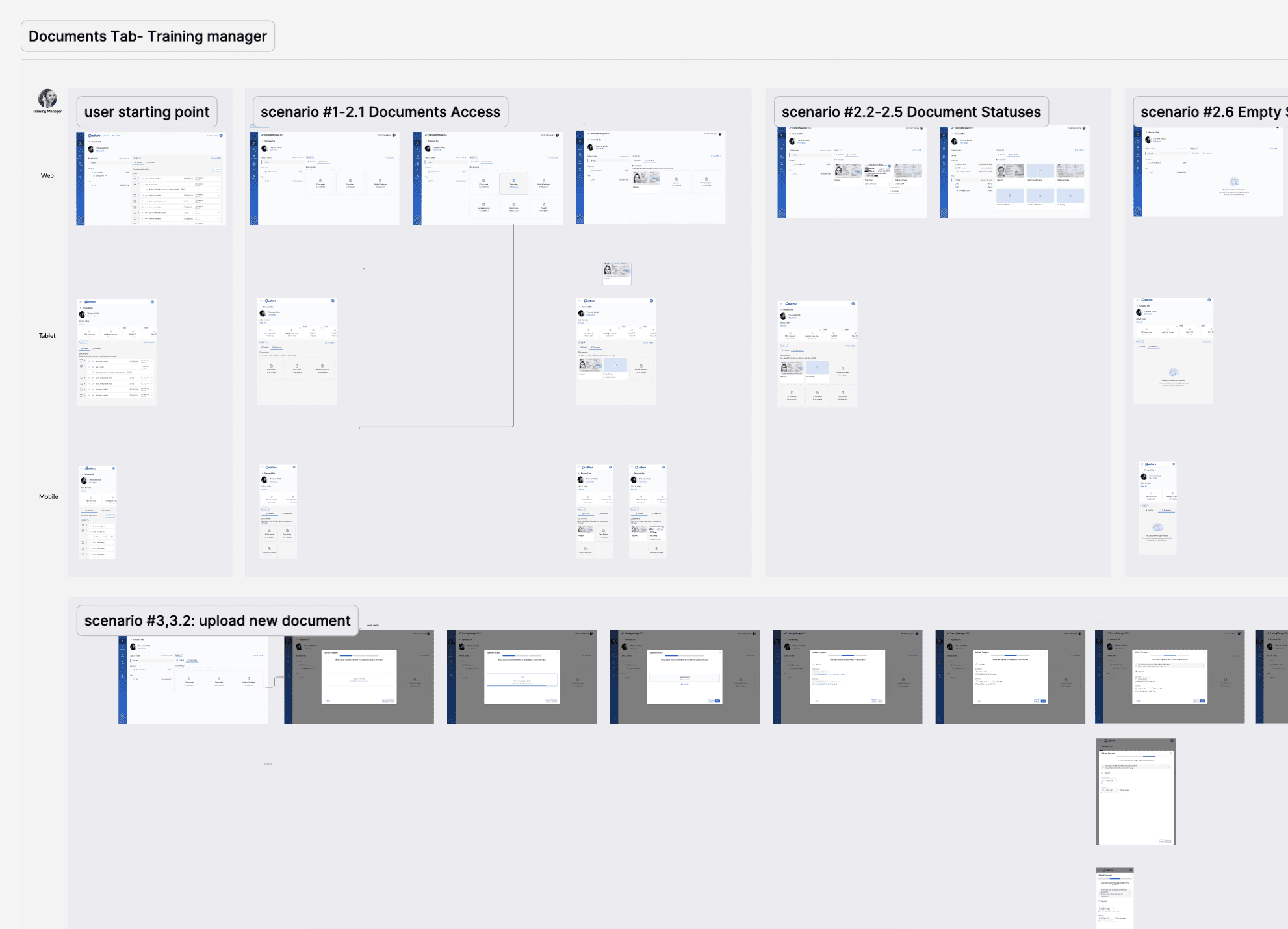
Give each user role a clear view of their required documents
Document upload directly within the personal file
AI-based validation to automatically check document type, validity dates, and compliance status
Present new functionality as a 'wallet for documents' on mobile devices
Reduce time on operational and compliance checks
Users & Roles
The feature was designed for three distinct personas, each with different needs and permissions:

Trainee
Uploads required documents to complete their initial verification. Sees only their own requirements and upload status. On mobile, the document view functions as a portable wallet for presenting credentials

Instructor
Similar upload flow to the trainee, but with a different document requirement set and permissions.

Training Manager
The administrative oversight role. Can view all documents across trainees and instructors, monitor issues, trigger re-verification requests, and manage document statuses.
Key UI Decisions
Required Documents states
When a user first lands on the Documents tab, they see a clean three-slot layout (ID Document, Type Rating, Medical Certificate) with placeholder states and a clear call to action. This communicates exactly what is missing without overwhelming the user.

Upload & AI validation flow
Upon upload, the system passes the document through an AI check that evaluates document type recognition, expiry date parsing, and format validity. Results are surfaced inline with status indicators : valid, expiring soon, or flagged, removes the need for manual review in standard cases.

Expiry visibility
Documents nearing expiry are highlighted with a color-coded warning (e.g., "Expires in 30 days") directly on the document card, prompting proactive renewal before compliance lapses.

Responsive Design
I built the layout across three breakpoints: desktop, tablet, and mobile.
Mobile works as a document wallet, optimized for presenting documents rather than managing them.
Design System Contribution: Document Card
The Documents feature needed a way to show one document across its whole lifecycle: missing, uploaded, expiring and expired. None of the existing card patterns could do that. So I designed a new Document Card component and added it to the design system, keeping its spacing, radius, typography and color tokens consistent with the rest of the system.
One component, one lifecycle. Each card shows a single required document, such as a Passport, Type Rating or Cabin Crew Attestation. Its states follow what happens to that document, so users can see their compliance status at a glance without opening anything.
Empty state: an upload slot
Each required document starts as an empty card with a dashed outline, an upload icon and the note "No file uploaded", so it's clear what's missing. When a user hovers over the card or drags a file onto it, the border turns solid blue and the card fills with a light tint. That shows the whole card is a drop target, not just a small button.

Filled states: Document lifecycle
Once a file is uploaded, the card shows a preview of the document. Files that can't show a preview get a neutral file icon, so every card in the grid stays the same size. The selected state uses a blue outline. The expired state adds a red badge ("Expired at 10.10.25") so the problem is easy to spot. The actions menu changes with the card's state, so replacing an expired document takes one step: "Upload new".

Outcome
The feature brought real compliance structure to a process that was previously held together with emails and manual checks. Each role got a clear, guided upload path — no guesswork, no incomplete submissions.
AI validation caught mismatches and expired documents at upload, cutting out the entire back-and-forth review cycle. Mobile turned the feature into a digital wallet, so staff could carry and present credentials on the spot.
I designed and built new components specifically for this feature, keeping them consistent with the overall system while solving problems that existing patterns couldn't cover. The result was a more auditable, proactive compliance process and a measurable reduction in risk for the organization.